众所周知,知所众周
Waline的默认邮件模板就是一坨
简陋得不能再简陋,而官方文档的配置写得又非常难懂。
接下来主包将手把手教你自定义Waline的邮件模板,话不多说,直接耍起
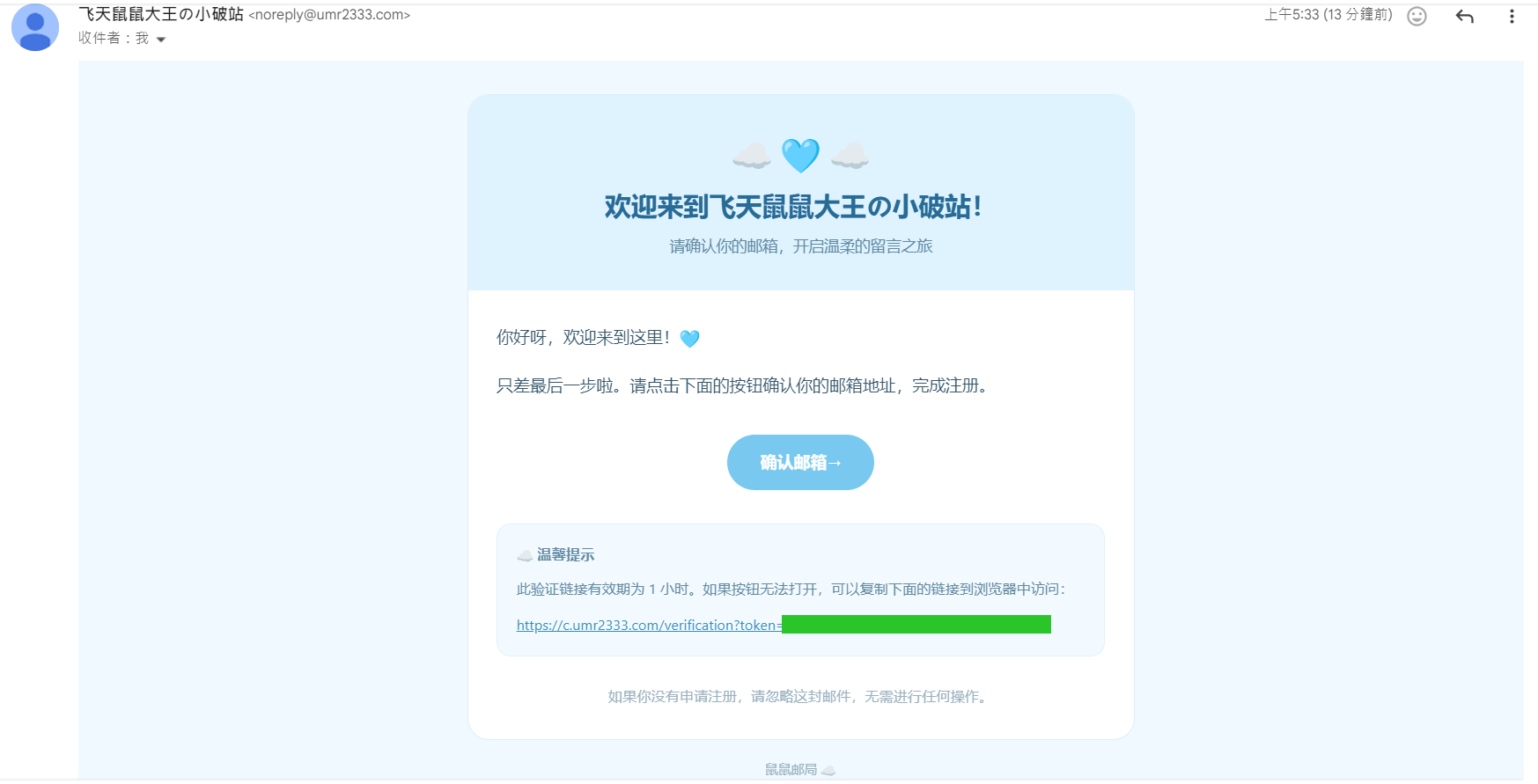
先看看修改前后的效果对比:
为节省篇幅,仅展示注册邮件这一项
想学就接着往下看
先说最简单的:
如何让Waline发送的邮件发件人为自定义名称?
官方文档只告诉你要在vercel的Environment Variables中写入SENDER_NAME的变量,(Key:SENDER_NAME,Value:你想显示的发件人名称)
但是没告诉你必须同时要写入SENDER_EMAIL才能生效
别以为你写了SMTP_USER就不用写SENDER_EMAIL了,不写是不会生效的。
接下来的改动都要在你github的Waline项目仓库中进行
主要就是改动这个index.cjs
别看他只有几行字就以为没什么用,你的改动就是要在这里进行的
这里展示一下主包跟chatgpt改完的index.cjs,可以直接抄作业
1
2
3
4
5
6
7
8
9
10
11
12
13
14
15
16
17
18
19
20
21
22
23
24
25
26
27
28
29
30
31
32
33
34
35
36
37
38
39
40
41
42
43
44
45
46
47
48
49
50
51
52
53
54
55
56
57
58
59
60
61
62
63
64
65
66
67
68
69
70
71
72
73
74
75
76
77
78
79
80
81
82
83
84
85
86
87
88
89
90
91
92
93
94
95
96
97
98
99
100
101
102
103
104
105
106
107
108
109
110
111
112
113
114
115
116
117
118
119
120
121
122
123
124
125
126
127
128
129
130
131
132
133
134
135
136
137
138
139
140
141
142
143
144
145
146
147
148
149
150
151
152
153
154
155
156
157
158
159
160
161
162
163
164
165
166
167
168
169
170
171
172
173
174
175
176
177
178
179
180
181
182
183
184
185
// ================================ // 测试模板是否载入,显示waline版本 // ================================ console.log('[PREVIEW CHECK] custom Waline index loaded' ); console.log('[WALINE VERSION]' , require('@waline/vercel/package.json' ).version); const Application = require('@waline/vercel' ); // ================================ // 注册验证邮件模板 // ================================ const registrationMailTemplate = ` <div style="margin:0;padding:28px 12px;background:#f0f9ff;font-family:-apple-system,BlinkMacSystemFont,'Segoe UI',Arial,'Microsoft YaHei',sans-serif;color:#35566b;" > <div style="max-width:560px;margin:0 auto;background:#ffffff;border:1px solid #d9effb;border-radius:18px;overflow:hidden;" > <div style="padding:26px 24px;background:#dff3ff;text-align:center;" > <div style="font-size:28px;line-height:1.5;" >☁️ 🩵 ☁️</div> <h2 style="margin:8px 0 6px;font-size:22px;color:#276b96;" >欢迎来到飞天鼠鼠大王の小破站!</h2> <p style="margin:0;font-size:13px;line-height:1.8;color:#628aa2;" >请确认你的邮箱,开启温柔的留言之旅</p> </div> <div style="padding:26px 24px;" > <p style="margin:0 0 14px;font-size:14px;line-height:1.9;" >你好呀,欢迎来到这里!🩵</p> <p style="margin:0 0 22px;font-size:14px;line-height:1.9;" >只差最后一步啦。请点击下面的按钮确认你的邮箱地址,完成注册。</p> <div style="text-align:center;margin:28px 0;" > <a href="{{url}}" style="display:inline-block;padding:13px 28px;background:#78c8ef;color:#ffffff;text-decoration:none;font-size:14px;font-weight:600;border-radius:24px;" >确认邮箱→</a> </div> <div style="padding:14px 16px;background:#f3faff;border:1px solid #e1f1fb;border-radius:12px;font-size:12px;line-height:1.9;color:#628aa2;" > <p style="margin:0 0 6px;font-weight:600;" >☁️ 温馨提示</p> <p style="margin:0;" >此验证链接有效期为 1 小时。如果按钮无法打开,可以复制下面的链接到浏览器中访问:</p> <p style="margin:8px 0 0;overflow-wrap:anywhere;" ><a href="{{url}}" style="color:#398bb8;word-break:break-all;" >{{url}}</a></p> </div> <p style="margin:22px 0 0;text-align:center;font-size:12px;line-height:1.8;color:#9ab1bf;" >如果你没有申请注册,请忽略这封邮件,无需进行任何操作。</p> </div> </div> <p style="margin:16px auto 0;text-align:center;font-size:11px;color:#9ab1bf;" >鼠鼠邮局 ☁️</p> </div> `; // ================================ // 重设密码邮件模板 // ================================ const resetPasswordMailTemplate = ` <div style="margin:0;padding:28px 12px;background:#f0f9ff;font-family:-apple-system,BlinkMacSystemFont,'Segoe UI',Arial,'Microsoft YaHei',sans-serif;color:#35566b;" > <div style="max-width:560px;margin:0 auto;background:#ffffff;border:1px solid #d9effb;border-radius:18px;overflow:hidden;" > <div style="padding:26px 24px;background:#dff3ff;text-align:center;" > <div style="font-size:28px;line-height:1.5;" >☁️ 🩵 ☁️</div> <h2 style="margin:8px 0 6px;font-size:22px;color:#276b96;" >找回密码的小纸条</h2> <p style="margin:0;font-size:13px;line-height:1.8;color:#628aa2;" >别担心,我们来帮你找回账号~</p> </div> <div style="padding:26px 24px;" > <p style="margin:0 0 14px;font-size:14px;line-height:1.9;" >你好呀!🩵</p> <p style="margin:0 0 22px;font-size:14px;line-height:1.9;" >我们收到了重设密码的请求。请点击下面的按钮,前往页面设置新密码。</p> <div style="text-align:center;margin:28px 0;" > <a href="{{url}}" style="display:inline-block;padding:13px 28px;background:#78c8ef;color:#ffffff;text-decoration:none;font-size:14px;font-weight:600;border-radius:24px;" >前往重设密码 →</a> </div> <div style="padding:14px 16px;background:#f3faff;border:1px solid #e1f1fb;border-radius:12px;font-size:12px;line-height:1.9;color:#628aa2;" > <p style="margin:0 0 6px;font-weight:600;" >🩵 安全小提醒</p> <p style="margin:0;" >请妥善保管这封邮件中的链接,不要转发给他人。如果不是你本人申请重设密码,请忽略这封邮件。</p> <p style="margin:10px 0 0;" >如果按钮无法打开,可以复制下面的链接到浏览器中访问:</p> <p style="margin:8px 0 0;overflow-wrap:anywhere;" ><a href="{{url}}" style="color:#398bb8;word-break:break-all;" >{{url}}</a></p> </div> <p style="margin:22px 0 0;text-align:center;font-size:12px;line-height:1.8;color:#9ab1bf;" >愿你在本站的每一次停留,都轻松而安心。</p> </div> </div> <p style="margin:16px auto 0;text-align:center;font-size:11px;color:#9ab1bf;" >鼠鼠邮局 ☁️</p> </div> `; // ================================ // 评论回复通知邮件模板 // ================================ const replyMailTemplate = ` <div style="margin:0;padding:28px 12px;background:#f0f9ff;font-family:-apple-system,BlinkMacSystemFont,'Segoe UI',Arial,'Microsoft YaHei',sans-serif;color:#35566b;" > <div style="max-width:560px;margin:0 auto;background:#ffffff;border:1px solid #d9effb;border-radius:18px;overflow:hidden;" > <div style="padding:26px 24px;background:#dff3ff;text-align:center;" > <div style="font-size:28px;line-height:1.5;" >☁️ 🩵 ☁️</div> <h2 style="margin:8px 0 6px;font-size:22px;color:#276b96;" >你的评论收到回复啦!</h2> <p style="margin:0;font-size:13px;line-height:1.8;color:#628aa2;" >云朵捎来了一封新的留言</p> </div> <div style="padding:26px 24px;" > <p style="margin:0 0 14px;font-size:14px;line-height:1.8;" >你好呀,<strong style="color:#398bb8;" >{{parent.nick | safe}}</strong>!</p> <p style="margin:0 0 18px;font-size:14px;line-height:1.9;" > <strong>{{self.nick | safe}}</strong> 回复了你在 <a href="{{site.url}}" style="color:#398bb8;text-decoration:none;font-weight:600;" >{{site.name | safe}}</a> 留下的评论: </p> <div style="margin:0 0 18px;padding:14px 16px;background:#f3faff;border:1px solid #e1f1fb;border-radius:12px;" > <p style="margin:0 0 8px;font-size:12px;color:#8aa9bc;" >你之前说</p> <div style="font-size:14px;line-height:1.9;overflow-wrap:anywhere;" >{{parent.comment | safe}}</div> </div> <div style="margin:0 0 22px;padding:14px 16px;background:#eaf7ff;border-left:4px solid #80ccef;border-radius:10px;" > <p style="margin:0 0 8px;font-size:12px;color:#6296b3;" >对方回复</p> <div style="font-size:14px;line-height:1.9;overflow-wrap:anywhere;" >{{self.comment | safe}}</div> </div> <div style="text-align:center;margin:24px 0;" > <a href="{{site.postUrl}}" style="display:inline-block;padding:12px 25px;background:#78c8ef;color:#ffffff;text-decoration:none;font-size:14px;font-weight:600;border-radius:24px;" >查看完整对话 →</a> </div> <p style="margin:22px 0 0;text-align:center;font-size:12px;line-height:1.8;color:#9ab1bf;" >愿每一份分享,都能收到温柔的回应。<br>这是一封自动发送的通知邮件。</p> </div> </div> <p style="margin:16px auto 0;text-align:center;font-size:11px;color:#9ab1bf;" >鼠鼠邮局</p> </div> `; // ================================ // 管理员收到新评论通知邮件模板 // ================================ const adminMailTemplate = ` <div style="margin:0;padding:28px 12px;background:#f0f9ff;font-family:-apple-system,BlinkMacSystemFont,'Segoe UI',Arial,'Microsoft YaHei',sans-serif;color:#35566b;" > <div style="max-width:560px;margin:0 auto;background:#ffffff;border:1px solid #d9effb;border-radius:18px;overflow:hidden;" > <div style="padding:26px 24px;background:#dff3ff;text-align:center;" > <div style="font-size:28px;line-height:1.5;" >☁️ 🩵 ☁️</div> <h2 style="margin:8px 0 6px;font-size:22px;color:#276b96;" >收到一条新评论!</h2> <p style="margin:0;font-size:13px;line-height:1.8;color:#628aa2;" >您的网站又有新访客啦</p> </div> <div style="padding:26px 24px;" > <div style="margin:0 0 18px;padding:15px 16px;background:#f3faff;border:1px solid #e1f1fb;border-radius:12px;" > <p style="margin:0 0 8px;font-size:12px;color:#8aa9bc;" >留言来自</p> <p style="margin:0;font-size:16px;font-weight:700;color:#398bb8;overflow-wrap:anywhere;" >{{self.nick | safe}}</p> </div> <p style="margin:0 0 10px;font-size:14px;font-weight:600;color:#47738d;" >TA 写下了:</p> <div style="margin:0 0 22px;padding:16px;background:#eaf7ff;border-left:4px solid #80ccef;border-radius:10px;font-size:14px;line-height:1.9;overflow-wrap:anywhere;" >{{self.comment | safe}}</div> <div style="text-align:center;margin:24px 0;" > <a href="{{site.postUrl}}" style="display:inline-block;padding:12px 25px;background:#78c8ef;color:#ffffff;text-decoration:none;font-size:14px;font-weight:600;border-radius:24px;" >前往查看评论 →</a> </div> <p style="margin:22px 0 0;text-align:center;font-size:12px;line-height:1.8;color:#9ab1bf;" >记得去看看这份来自访客的留言哦。<br>这是一封自动发送的通知邮件。</p> </div> </div> <p style="margin:16px auto 0;text-align:center;font-size:11px;color:#9ab1bf;" >鼠鼠邮局</p> </div> `; // ================================ // 注册与重设密码邮件语言配置 // ================================ const cloudMailLocale = { '[{{name | safe}}] Registration Confirm Mail' : '☁️ 欢迎来到{{name | safe}}|请确认你的邮箱' , // 保留 Waline 原始翻译键,供自定义模板匹配 'Please click <a href="{{url}}">{{url}}<a/> to confirm registration, the link is valid for 1 hour. If you are not registering, please ignore this email.' : registrationMailTemplate, '[{{name | safe}}] Reset Password' : '🩵 找回密码的小纸条|{{name | safe}}' , 'Please click <a href="{{url}}">{{url}}</a> to login and change your password as soon as possible!' : resetPasswordMailTemplate, USER_EXIST: '这个账号已经注册过啦,请直接登录哦~' , }; // ================================ // Waline 服务端配置 // ================================ module.exports = Application({ plugins: [], // 语言代码使用小写 locales: { 'zh-cn' : cloudMailLocale, 'zh-tw' : cloudMailLocale, 'en-us' : cloudMailLocale, 'id' : cloudMailLocale, 'de' : cloudMailLocale, 'es-mx' : cloudMailLocale, 'fr' : cloudMailLocale, 'it' : cloudMailLocale, 'jp' : cloudMailLocale, 'ko-kr' : cloudMailLocale, 'pt-br' : cloudMailLocale, 'ru' : cloudMailLocale, 'vi' : cloudMailLocale, }, // 评论回复通知邮件 mailSubject: '☁️ 你的评论收到新回复啦|{{site.name | safe}}' , mailTemplate: replyMailTemplate, // 管理员收到的新评论通知 mailSubjectAdmin: '💌 {{site.name | safe}}收到新留言啦~' , mailTemplateAdmin: adminMailTemplate, // 保留空 postSave,不额外添加通知逻辑 async postSave(comment) {}, });
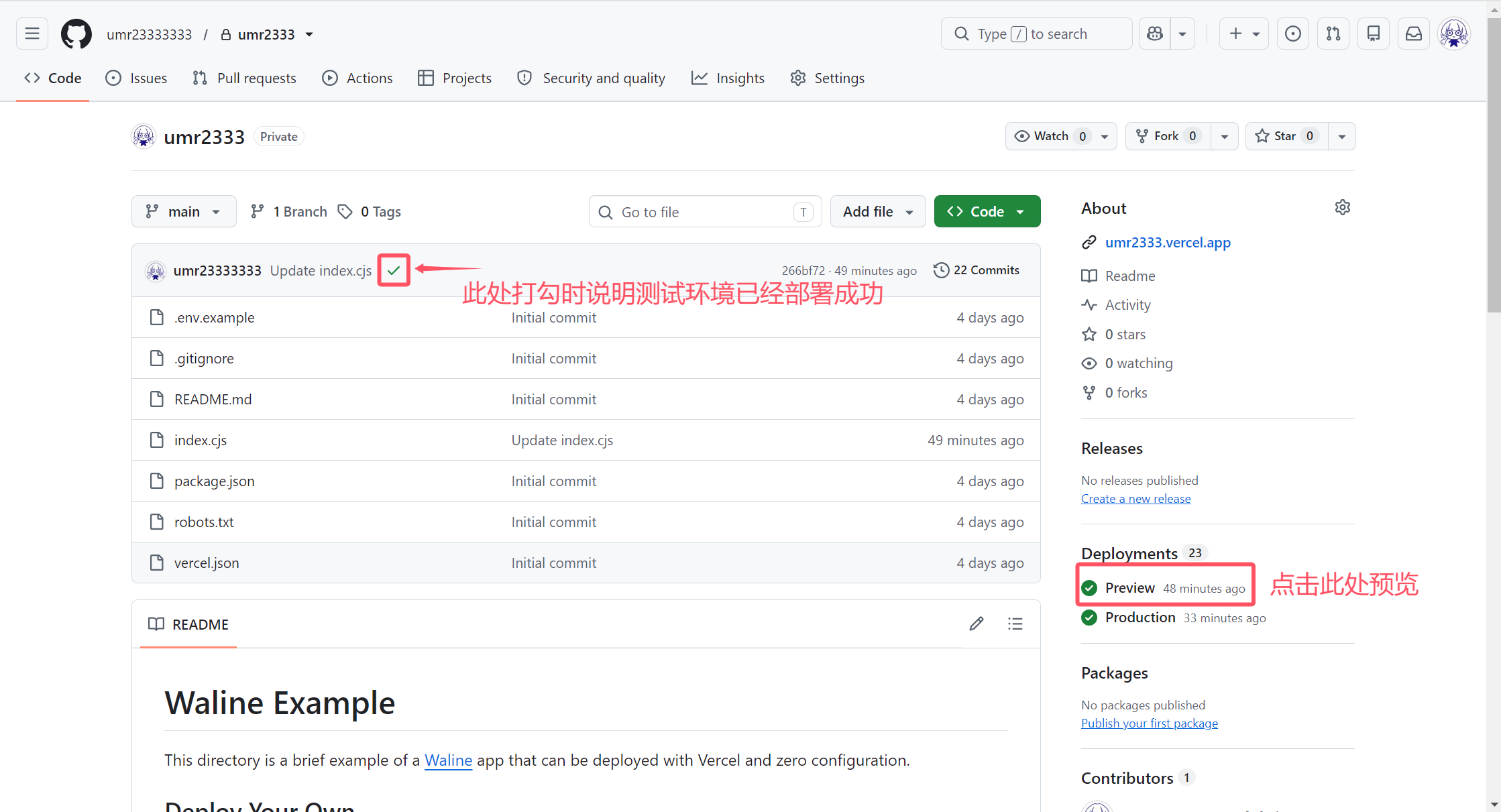
如果改动完直接提交是不会生效的
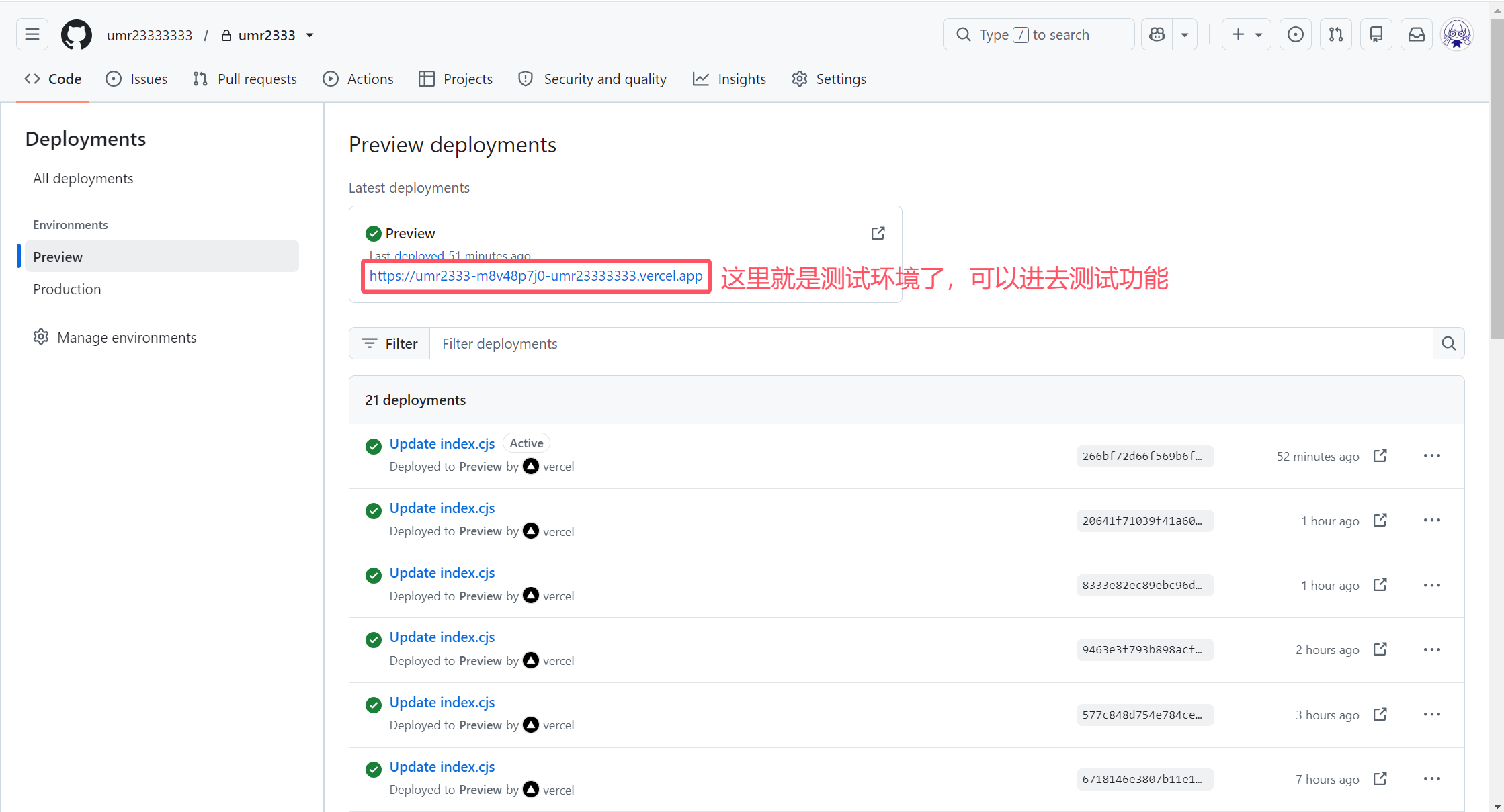
他会自动帮你部署一个Preview环境,当然你也可以直接测试
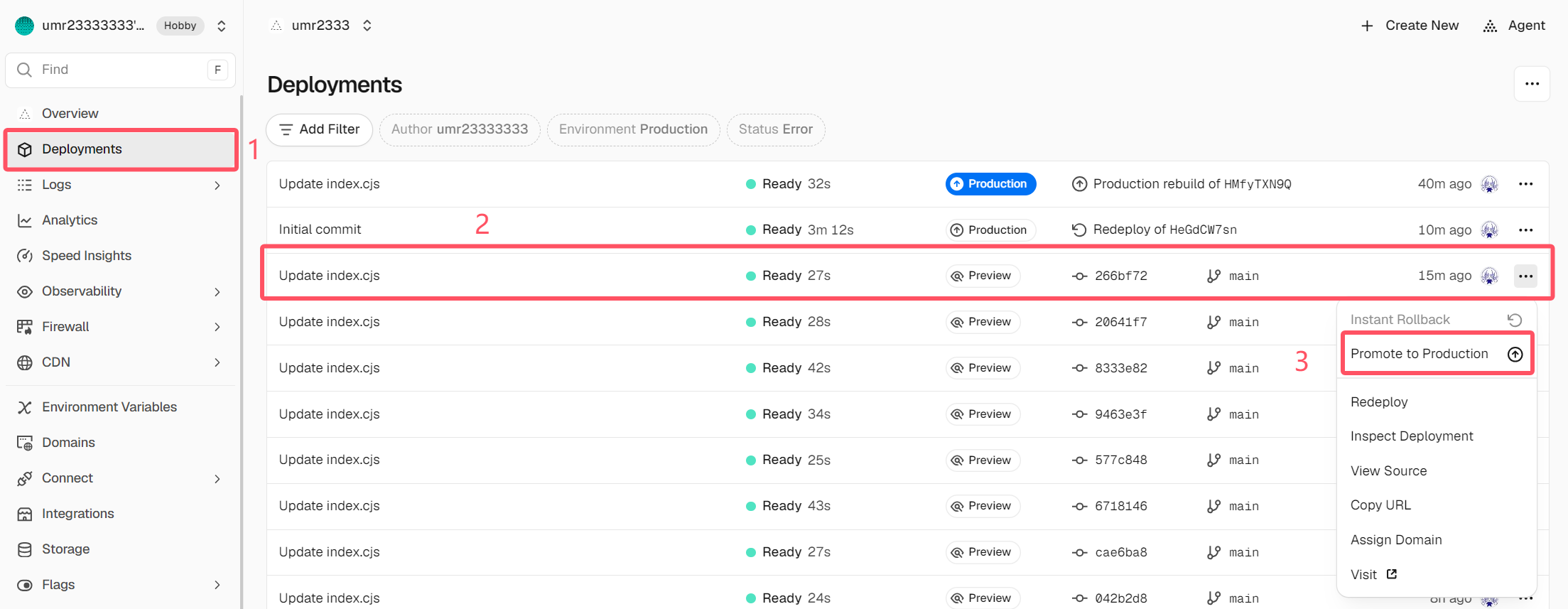
测试没问题以后打开你的vercel的Deployments,找到你测试过的Preview分支,并点击Promote to Production
直接在之前的Production点Reploy是没用的
邮件模板说明:
关于{{name | safe}}{{site.name | safe}}{{parent.nick | safe}}{{self.nick | safe}}
{{name | safe}}和{{site.name | safe}}都是你的网站名称,但是在不同的邮件中写法不一样
有的要写{{name | safe}}有的要写{{name | safe}}
甚至标题跟正文都有不一样的情况
以下是主包整理的测试结果:
=====================================================================
管理员邮件标题测试 A:;测试 B:飞天鼠鼠大王の小破站
测试 B:site.name = 飞天鼠鼠大王の小破站
测试 C:self.nick = test
测试 D:self.comment =
我是评论
注册标题测试 A:飞天鼠鼠大王の小破站;测试 B:
测试 B:site.name =
测试 C:url = https://xxxx.vercel.app/verification?token=xxxx (该结果正常)
测试 D:self.nick =
测试 E:parent.nick =
点击确认邮箱
重设密码标题测试 A:飞天鼠鼠大王の小破站;测试 B:
测试 B:site.name =
测试 C:url = https://xxxx.vercel.app/verification?token=xxxx (该结果正常)
测试 D:self.nick =
测试 E:parent.nick =
点击重设密码
回复邮件标题测试 A:;测试 B:飞天鼠鼠大王の小破站
=====================================================================
大家可以根据以上内容自定义自己的邮件模板
接下来放出测试专用的index.cjs来测试你的邮件模板编写
1
2
3
4
5
6
7
8
9
10
11
12
13
14
15
16
17
18
19
20
21
22
23
24
25
26
27
28
29
30
31
32
33
34
35
36
37
38
39
40
41
42
43
44
45
46
47
48
49
50
51
52
53
54
55
56
57
58
59
60
61
62
63
64
65
66
67
68
69
70
71
72
73
74
75
76
77
78
79
80
81
82
83
84
85
86
87
88
89
90
91
92
93
94
95
96
97
98
const Application = require('@waline/vercel' ); // 注册邮件测试模板 const registrationMailTemplate = ` <div style="font-family:Arial,sans-serif;padding:20px;" > <h2>注册邮件正文变量测试</h2> <p>测试 A:name = {{name | safe}}</p> <p>测试 B:site.name = {{site.name | safe}}</p> <p>测试 C:url = {{url}}</p> <p>测试 D:self.nick = {{self.nick | safe}}</p> <p>测试 E:parent.nick = {{parent.nick | safe}}</p> <p><a href="{{url}}" >点击确认邮箱</a></p> </div> `; // 重设密码测试模板 const resetPasswordMailTemplate = ` <div style="font-family:Arial,sans-serif;padding:20px;" > <h2>重设密码正文变量测试</h2> <p>测试 A:name = {{name | safe}}</p> <p>测试 B:site.name = {{site.name | safe}}</p> <p>测试 C:url = {{url}}</p> <p>测试 D:self.nick = {{self.nick | safe}}</p> <p>测试 E:parent.nick = {{parent.nick | safe}}</p> <p><a href="{{url}}" >点击重设密码</a></p> </div> `; // 评论回复测试模板 const replyMailTemplate = ` <div style="font-family:Arial,sans-serif;padding:20px;" > <h2>评论回复正文变量测试</h2> <p>测试 A:name = {{name | safe}}</p> <p>测试 B:site.name = {{site.name | safe}}</p> <p>测试 C:parent.nick = {{parent.nick | safe}}</p> <p>测试 D:self.nick = {{self.nick | safe}}</p> <p>测试 E:self.comment = {{self.comment | safe}}</p> </div> `; // 管理员通知测试模板 const adminMailTemplate = ` <div style="font-family:Arial,sans-serif;padding:20px;" > <h2>管理员通知正文变量测试</h2> <p>测试 A:name = {{name | safe}}</p> <p>测试 B:site.name = {{site.name | safe}}</p> <p>测试 C:self.nick = {{self.nick | safe}}</p> <p>测试 D:self.comment = {{self.comment | safe}}</p> </div> `; // 注册与重设密码邮件语言配置 const cloudMailLocale = { '[{{name | safe}}] Registration Confirm Mail' : '注册标题测试 A:{{name | safe}};测试 B:{{site.name | safe}}' , 'Please click <a href="{{url}}">{{url}}<a/> to confirm registration, the link is valid for 1 hour. If you are not registering, please ignore this email.' : registrationMailTemplate, '[{{name | safe}}] Reset Password' : '重设密码标题测试 A:{{name | safe}};测试 B:{{site.name | safe}}' , 'Please click <a href="{{url}}">{{url}}</a> to login and change your password as soon as possible!' : resetPasswordMailTemplate, USER_EXIST: '这个账号已经注册过啦,请直接登录哦~' , }; module.exports = Application({ plugins: [], locales: { 'zh-cn' : cloudMailLocale, 'zh-tw' : cloudMailLocale, 'en-us' : cloudMailLocale, 'id' : cloudMailLocale, 'de' : cloudMailLocale, 'es-mx' : cloudMailLocale, 'fr' : cloudMailLocale, 'it' : cloudMailLocale, 'jp' : cloudMailLocale, 'ko-kr' : cloudMailLocale, 'pt-br' : cloudMailLocale, 'ru' : cloudMailLocale, 'vi' : cloudMailLocale, }, mailSubject: '回复邮件标题测试 A:{{name | safe}};测试 B:{{site.name | safe}}' , mailTemplate: replyMailTemplate, mailSubjectAdmin: '管理员邮件标题测试 A:{{name | safe}};测试 B:{{site.name | safe}}' , mailTemplateAdmin: adminMailTemplate, async postSave(comment) { // 保留原有配置 }, });
接下来就自行发挥想象力了
散会。

评论区